

Why Collaboration Tools Matter for AP Students
Preparing for AP exams isn’t just about solitary hours with a textbook. Increasingly, success comes from smart collaboration: sharing notes, building review slides together, iterating on practice essays, and tracking how study materials evolve over time. Slides, Docs, and versioning systems give you the scaffolding to turn scattered effort into coordinated momentum — whether you’re creating a group review for AP Biology, co-writing a mock DBQ for AP U.S. History, or building a collective study guide for AP Calculus.
This guide gives AP students a friendly, practical road map for using collaboration tools well. You’ll get clear workflows, real-world examples, a simple versioning cheat sheet, and a table you can use to plan weekly group study. Along the way I’ll also point out how personalized tutoring — for example, Sparkl’s 1-on-1 guidance and tailored study plans — can plug into these workflows to make them even more effective.
Start with the Right Mindset: Purpose Before Platform
Before you open a new doc or create a slide deck, ask two questions: What’s the objective? And who’s responsible for what? Collaboration tools are powerful, but they work best when your group has a clear purpose.
- Objective: Define the deliverable. Is it a concise 20-slide AP Physics review deck? A shared Cornell-notes Doc for AP Spanish? A versioned archive of practice free-response essays?
- Roles: Decide who drafts, who reviews, and who finalizes. Even at a basic level — Drafter, Editor, Verifier — roles reduce friction and stop things from getting duplicated.
Build that agreement into the first lines of the Doc or the first slide of the deck. It takes a minute and saves hours of confusion.
Docs: The Living Study Document
How to structure a shared AP Doc
A shared Doc becomes the single source of truth for your study group. Here’s a practical structure you can copy:
- Title and Purpose: One line that explains what the Doc is for (e.g., “AP Chem Unit 3 Concept Map — For Week of Apr 6”).
- Table of Contents: Use headings and an auto-generated TOC so team members can jump to specific sections (equilibrium, kinetics, practice problems, etc.).
- Responsibility Table: Who’s writing what and deadlines.
- Resource Bank: Links to class handouts, teacher slides (if allowed), and a curated list of practice problems.
- Active Work Area: The core notes, explanations, solved problems, and annotated answers.
- Q&A Thread: A rolling list where people post questions and teammates answer so nothing is lost in chat apps.
Tip: Use comment threads for debate and suggestion; keep the main document focused on summary and synthesis. Comments are easier to resolve and review before finalizing content for exam review.
Best practices for Docs
- Use headings for structure and the built-in outline to navigate.
- Accept or resolve comments daily after study sessions so the doc reflects final decisions.
- Keep an edit log at the end: brief notes on what changed and who changed it — this doubles as versioning when you need a quick snapshot.
- For essays and long-form responses, use a separate folder labeled by date and version number (more on versioning below).

Slides: Visual Review That Sticks
Designing a review deck that helps memory
Slides aren’t just for presentations — they’re microflashcards. A great review deck uses visuals, concise bullets, and active prompts rather than pages of dense text. Treat each slide as a single idea or practice task.
- One Concept per Slide: Keep it focused so you can shuffle or export slides per chapter.
- Use Visuals: Diagrams, labeled charts, and short animations (sparingly) help memory — especially for subjects like AP Biology and AP Physics.
- Active Prompts: Instead of “Oxidation-Reduction Reactions,” write a quick prompt: “Predict the oxidized species in this reaction.” Put the answer on the next slide or in the speaker notes.
- Speaker Notes = Mini-Lectures: Use notes to write the one-sentence explanation you’d give in a study group. Helpful for quick review without cluttering the slide.
Collaborative slide workflows
When multiple students contribute slides, you need guardrails:
- Assign slide ranges (e.g., Alice 1–10, Ben 11–20).
- Agree on a visual template (fonts, color palette, and a header/footer for the unit and date).
- Use the “Comments” and “Suggest Edits” features to iterate without overwriting someone else’s work.
Versioning: Why You Need It and How to Do It Well
Versioning is tracking how a document changes over time. For AP prep, a strong versioning practice prevents lost work, makes feedback meaningful, and lets you compare early drafts of essays or problem sets to final versions to measure progress.
Simple versioning conventions
Use this lightweight convention for file names and Doc/Slide titles:
- BaseName_V#_YYYYMMDD_AuthorInitials (e.g., APUSH_DBQ_V2_20251007_JS)
- Keep the earliest drafts as V1 and increment for major rewrites. Use decimals for small tweaks (V1.1).
- On each save, write a one-line change note (either in the file name or in a small changelog inside the document).
When to branch vs. when to overwrite
Branch (create a new file) when you test a different approach or when multiple teams try different study strategies. Overwrite (or update the same file) when you’re refining a single authoritative resource. Branching is especially useful for essays: one student’s version might emphasize structure while another’s focuses on evidence — both are valuable and worth preserving.
A Practical Versioning Cheat Sheet
| Scenario | Action | File Naming Example |
|---|---|---|
| Initial group draft of review slides | Create a V1 file; assign slide owners | APBio_Unit4_Review_V1_20251001_JM |
| Major rewrite after teacher feedback | Branch to V2; summarize feedback in changelog | APBio_Unit4_Review_V2_20251010_JM |
| Minor typo fixes and formatting | Increment decimal version | APBio_Unit4_Review_V2.1_20251011_JM |
| Alternate study approach (flashcards vs. practice problems) | Create separate branch for comparison | APBio_Unit4_Flashcards_V1_20251012_JM |
Integrating Collaboration Into Real AP Workflows
Here are three concrete examples you can copy tomorrow.
Example 1 — Group Review Deck for an AP Exam
- Create a master Slides deck titled with the exam and unit.
- Use a simple template with: Topic Title, 1–2 visual aids, and an active prompt.
- Divide slides and set a one-week deadline for first drafts.
- Schedule a 60-minute session to assemble, critique, and finalize the deck; record decisions in the deck’s changelog.
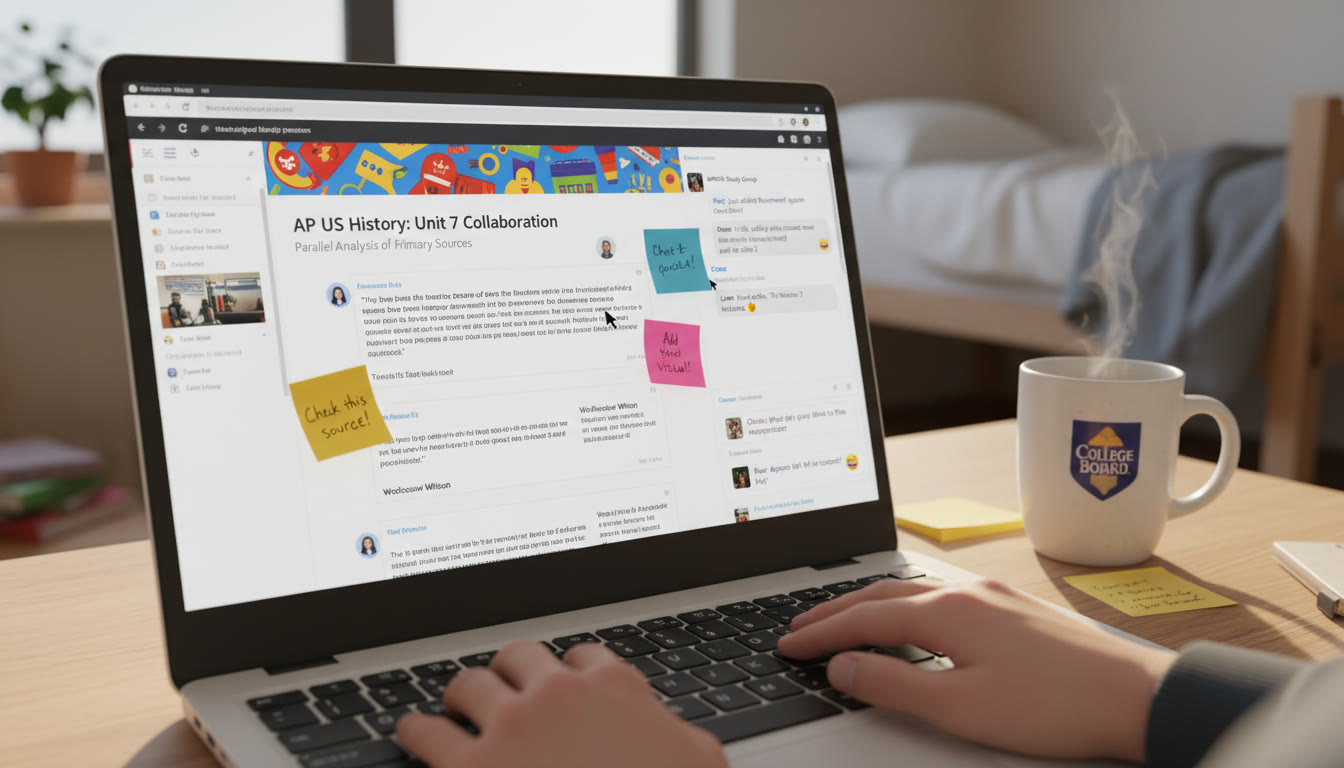
Example 2 — Collaborative DBQ Practice (AP History)
- Create a shared Doc with a section for thesis sketches, evidence lists, and annotated outlines.
- Each student drafts a 15–20 minute timed response in a separate version file.
- Peers use comment threads to give three targeted pieces of feedback: thesis clarity, evidence relevance, and structure.
- Finalize a polished version and tag it as V1_Final for future review before the exam.
Example 3 — Problem Sets for AP Calculus or AP Physics
- Create a Doc with sections by topic and a bank of practice problems labeled by difficulty.
- Each student solves problems in a personal branch; teachers or peers check solutions in a shared comments pass.
- After corrections, transfer the polished solutions into the shared “Answer Bank” and increment the version.
How to Keep Collaboration Efficient — Practical Habits
- Daily 10‑minute Standups: A short note in the Doc or a 10‑minute group call to align on progress and blockers.
- Designate a Finalizer: Someone who does the final sweep — fixing formatting, resolving comments, and assembling all parts.
- Archive Old Versions: Move outdated files into an Archive folder labeled by month so the main folder stays tidy.
- Practice Single‑Source Updates: If resources exist in multiple places, decide which is the canonical location (usually a single Doc or Slides file) to avoid split attention.
Using Tools to Track Progress and Accountability
Many students underestimate the power of simple accountability. A shared spreadsheet or a small table inside your Doc can track who completed what and when. Below is a sample weekly plan you can adapt for AP prep.
| Day | Focus | Deliverable | Owner |
|---|---|---|---|
| Monday | Concept Review | Slides 1–5 Draft | Alice |
| Tuesday | Practice Problems | Doc: Problem Set Solutions | Ben |
| Wednesday | Timed Practice | DBQ Drafts (V1) | Group |
| Thursday | Peer Review | Comments Resolved | Carol |
| Friday | Final Sweep | V1_Final Published | David |
When Personalized Tutoring Enters the Workflow
Layering personalized tutoring onto your collaboration workflow can transform output into insight. A tutor who reviews your group slides or Doc can offer targeted guidance on what matters most for the AP rubric, suggest high‑impact edits, and help you prioritize practice problems. For example, Sparkl’s personalized tutoring offers 1-on-1 guidance, tailored study plans, expert tutors, and AI-driven insights — resources that can be slotted into your collaborative process at these points:
- After your first draft: a tutor reviews the deck and suggests rubric-aligned improvements.
- Before finalizing essays: a tutor runs a mock scoring pass and gives concrete edits.
- Personal weak-spot work: matched tutoring sessions to shore up the topics exposed by group work.
Think of tutoring as a force multiplier — not a replacement for group effort, but a way to sharpen it so you get higher-quality practice and clearer feedback.
Common Collaboration Pitfalls and How to Avoid Them
- Pitfall: Endless Rewrites. Fix: Limit major rewrites to scheduled “revision windows” and use smaller decimals for quick fixes.
- Pitfall: Conflicting Versions. Fix: Have one canonical file and enforce the naming convention. If branches are needed, move older versions into Archive with clear labels.
- Pitfall: No Ownership. Fix: Assign roles for drafting, editing, and finalizing at the top of the Doc; rotate roles to spread learning.
- Pitfall: Over-reliance on Passive Sharing. Fix: Turn passive resources into active tasks — quizzes, timed prompts, or mini-presentations — so shared materials become practiced knowledge.
Measuring Progress: Simple Metrics That Work
You don’t need complex analytics. Here are three easy measures:
- Practice Frequency: Number of timed practice sessions completed per week.
- Revision Count: How many meaningful revisions (V1 → V2) a Doc or deck has — improvement often shows up in iteration.
- Accuracy Growth: Track change in scores on practice problems or timed essays over four weeks.
These metrics let you spot plateaus and adjust: more targeted tutoring, a different pacing strategy, or a reworked study schedule.
Final Checklist Before an AP Exam
- Consolidate the final review deck and mark it VFinal.
- Ensure the core Doc has a polished summary of high-yield concepts and a quick Q&A section.
- Run a timed mock with your group, rotate who grades, and keep a changelog of improvements.
- Schedule a couple of targeted tutoring sessions to fix last-minute weak spots and sharpen test strategies.
- Archive earlier versions for post-exam reflection so you can see what changed and why.
Conclusion: Collaboration Is a Skill — Practice It Deliberately
Using Slides, Docs, and versioning is more than a technical exercise; it’s a teamwork skill that pays off under exam pressure. Start small: a single shared Doc with clear roles, a 20-slide review deck, and a simple versioning rule. Over time, your group will learn the rhythm of drafting, reviewing, and finalizing — and that rhythm translates into confidence on exam day.
If you want to level up faster, consider weaving in targeted tutoring. Sparkl’s personalized tutoring — with 1-on-1 guidance, tailored study plans, expert tutors, and AI-driven insights — can slot into your existing collaboration process and accelerate progress by focusing effort where it matters most.
Above all, make your collaboration active: use slides to quiz one another, use Docs for shared synthesis, and use versioning to celebrate how far you’ve come. With clarity, structure, and a few good habits, your group can turn digital tools into exam‑day advantage.

























No Comments
Leave a comment Cancel