

Why a Family Calendar Pack Changes the AP Game
Balancing Advanced Placement (AP) courses alongside extracurriculars, family life, and college planning can feel like juggling flaming torches while riding a unicycle. One dropped torch is often a missed deadline, an incomplete practice test, or a last-minute cram session. That’s where a Family Calendar Pack comes in — a shared approach to planning that keeps students, parents, and tutors aligned so deadlines become stepping stones instead of stumbling blocks.

What the Family Calendar Pack Is (and Isn’t)
Think of the Family Calendar Pack as a toolkit: a shared digital calendar, a printable timeline, buffer rules, alert settings, and a set of communication habits. It’s not a rigid schedule that removes autonomy from the student; instead, it’s a collaborative scaffolding that helps students build reliability and parents offer the right support at the right times.
Core Components of the Calendar Pack
A practical calendar pack combines structure with flexibility. Below are the essential parts you’ll want to include and why each matters.
1. Master Exam and Assignment Calendar
This is the backbone: all AP exam dates, major unit exams, project due dates, and school-imposed deadlines. Make it readable at a glance and color-coded (e.g., red for exams, orange for large projects, blue for practice tests).
2. Buffer Windows
Buffers are blocks of time before a deadline reserved for unforeseen delays, review, and revision. A 3–7 day buffer before any major submission or exam reduces last-minute stress and improves final quality.
3. Alert Rules and Cadence
Set alerts with multiple cadences: a month out, a week out, and 48 hours before critical milestones. For lower-stakes items, a single alert a week prior may be enough. Use push notifications for instant reminders and email for weekly summaries.
4. Weekly Planning Ritual
Schedule a 20–30 minute family planning check each Sunday evening. This ritual reviews the week’s top priorities, clarifies responsibilities, and offers a chance for tutors (or Sparkl’s coaches) to confirm alignment on study plans.
5. Shared Resource Links and Study Materials
Attach a short list of go-to resources to each calendar entry: practice exams, topic guides, and one or two recommended tutoring sessions. When tailored tutoring is part of the plan (for example, Sparkl’s 1-on-1 guidance or AI-driven insights), reference it in the calendar entry so it’s matched to the right learning objective.
How to Build Your Family Calendar Pack — Step by Step
Below is a practical sequence to create a calendar that’s both comprehensive and human-friendly.
- Step 1: Gather dates. Collect AP exam dates, school midterms, major assignments, and known extracurricular commitments.
- Step 2: Enter master dates. Add them to a central digital calendar shared with all family members (Google Calendar, iOS, or a preferred family organizer).
- Step 3: Add buffers. For every major item, create a buffer window — highlighted or separate-block events that begin before the due date.
- Step 4: Set alerts. Use multiple reminders and choose channels by urgency (text for immediate, email for weekly).
- Step 5: Create weekly review slots. Make a recurring family check-in to keep momentum and address bottlenecks.
- Step 6: Integrate tutoring sessions. Schedule regular tutor check-ins or targeted Sparkl sessions for skills that need reinforcement.
Sample Calendar Structure: What to Put Where
Here’s a simple table to visualize the distribution of items in a healthy calendar pack. Use this to help set expectations and assign ownership for alerts and planning.
| Item | Owner | Lead Time | Buffer | Alert Cadence |
|---|---|---|---|---|
| AP Exam Date | Student + Parent | 6–8 weeks | 7 days | 4 weeks, 1 week, 48 hours |
| School Unit Exam | Student | 3 weeks | 3 days | 2 weeks, 3 days |
| Major Project | Student + Parent | 4 weeks | 5 days | 2 weeks, 1 week, 48 hours |
| Practice Full-Length Exam | Student + Tutor | 6 weeks | 2 days | 1 week, 48 hours |
Buffer Rules: Simple, Smart, Non-Negotiable
Buffers are the unsung heroes of calm productivity. Here are practical rules to make buffers effective — not decorative.
- Rule 1: Buffers are sacred. No new commitments get scheduled inside a buffer unless it’s an emergency. This creates a safety net for illness, unexpected school work, or extra revision.
- Rule 2: Use buffers for review, not cram. The buffer should include at least one complete review cycle: quick notes review, practice with targeted problems, and a focused weak-point session.
- Rule 3: Share responsibility. Parents can help by holding logistics (rides, chores) steady during buffers so students can focus.
- Rule 4: Adjust, don’t overfill. If a buffer regularly gets consumed, extend it next time or break the task into smaller milestones earlier in the timeline.
Alert Strategies That Actually Work
Flooding someone with alerts is a quick way to trigger the ‘mute’ instinct. Instead, make alerts intelligent and respectful.
Alert Types and Use Cases
- Soft Alerts: Weekly summary emails with what’s coming up. Calm, big-picture reminders for parents and students.
- Hard Alerts: Push notifications 48 hours before critical events (full practice exams, due dates).
- Micro-Reminders: Short check-ins for small tasks (e.g., “15-minute vocab review”), ideal for habit formation without stress.
Communication Protocols: Keep It Simple
Calendars are useful, but they don’t replace clear conversation. Use these protocols to keep things human and efficient.
- Sunday Reset: A quick family meeting to confirm the week’s top three priorities for each student.
- Flag When Off-Track: If a student misses a buffer day, they or their parent should flag it immediately so the calendar can be adjusted.
- Celebrate Small Wins: When students finish a practice exam under timed conditions or hit a study streak, mark it on the calendar — visible wins build momentum.
How to Personalize the Pack for Different Student Types
Not every student studies the same way. Here are templates for three common archetypes and how their calendar packs should differ.
The Planner
Strengths: Organized, likes checklists. Calendar needs: many small milestones, clear timeslots, and a visible progress tracker.
The Spontaneous Deep Diver
Strengths: Intense focus on topics they care about. Calendar needs: flexible blocks for deep work, enforced buffers to avoid last-minute churn, and scheduled accountability check-ins.
The Overloaded Student
Strengths: Persistent but stretched thin. Calendar needs: priority labeling (must/should/nice), minimized alerts to avoid overwhelm, and clear transport of responsibilities to parents for logistics during heavy weeks.
Using Tutoring and AI-Driven Insights to Make the Calendar Smarter
Calendars are only as good as the actions they drive. Regular tutoring sessions — especially those that are personalized — help the calendar stay realistic and targeted. Integrating periodic check-ins with a tutor ensures study blocks focus on the right skills and topics, and that mock exam performance informs the next buffer.
Personalized tutoring services like Sparkl can fit naturally into this system: 1-on-1 guidance to identify weak spots, tailored study plans that align with calendar milestones, and AI-driven insights that highlight where time should be reallocated. When a practice exam shows repeated errors in, say, AP Calculus integration techniques, a Sparkl session can be scheduled immediately within the buffer window to address that exact skill.
Measurement: How to Know the Calendar Is Working
Put simple metrics in place so you can see progress without obsessing over numbers.
- Completion Rate: Percentage of calendar milestones completed on time each month.
- Buffer Consumption: How often buffers are used. Occasional use is healthy; constant use signals unrealistic planning.
- Practice Exam Trends: Track score improvements across practice exams and align wins to calendar tactics that preceded them.
Sample Monthly Planner (Visual Snapshot)
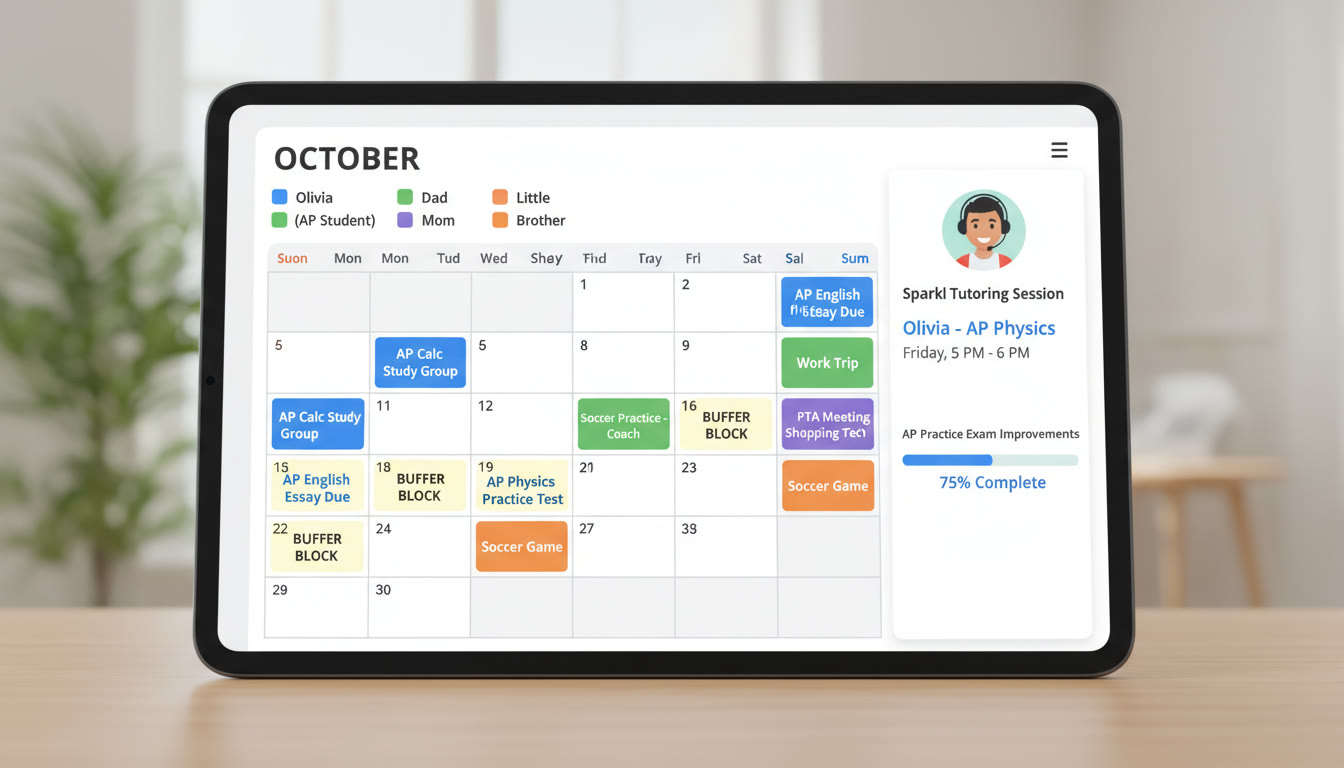
Here’s an example snapshot of how a single month might look for a student preparing for AP exams. Use this as a template and adapt dates and names to fit your family calendar.
| Week | Top Study Focus | Key Calendar Events | Buffer Days | Tutoring Sessions |
|---|---|---|---|---|
| Week 1 | Unit Review: AP Biology Unit 4 | Practice Quiz + Project Milestone | Thu–Sat | 1 Sparkl Session (Wednesday) |
| Week 2 | Timed Practice Exam: AP Biology | Full-Length Practice Exam (Sat) | Fri–Sun | Post-exam review with tutor (Mon) |
| Week 3 | Weak-Point Targeting | Essay Draft Due | Wed–Fri | 2 Short Sparkl Sessions |
| Week 4 | Final Review & Strategy | Mock Exam; Family Review Meeting | Thu–Sat | 1 Strategy Session |
Common Pitfalls and How to Avoid Them
Even the best calendars can fail without attention to human dynamics. Here are pitfalls to watch for and practical fixes.
Pitfall: Overfilled Calendars
Fix: Apply the “must/should/nice” filter. Only schedule musts as immovable; move some shoulds into flexible slots.
Pitfall: Alert Fatigue
Fix: Reduce non-essential alerts. Use weekly summaries and reserve push notifications for critical items.
Pitfall: Lack of Ownership
Fix: Assign clear owners for entries (student, parent, tutor). Ownership boosts follow-through.
Templates and Quick-Start Checklist
Use this checklist the first day you implement your calendar pack.
- Collect all important dates and add them to the master calendar.
- For each item, add a buffer event that starts before the due date.
- Set alert cadences for critical events (4 weeks, 1 week, 48 hours).
- Schedule a weekly family planning check-in.
- Block regular tutoring sessions for high-priority skills; mark them on the calendar.
- Track completion rate and buffer consumption at month’s end and adjust.
Closing: Make the Calendar Your Collaborative Coach
A Family Calendar Pack is more than a schedule. It’s a shared promise: that your student’s preparation is visible, supported, and adaptable. When families combine buffers, sensible alerts, and regular check-ins, the frantic last-minute rush gives way to steady, confident progress. Personalized tutoring — such as Sparkl’s expert 1-on-1 guidance and AI-informed recommendations — can plug into this ecosystem, helping prioritize the right practice, refine weak areas, and ensure that every buffer is used wisely.
Start small: pick one AP course, build a two-month calendar, and test the system with one practice exam. Iterate from there. The goal isn’t perfection — it’s predictable improvement and less stress for everyone involved. With a thoughtful Family Calendar Pack, deadlines become signals to prepare, not alarms that cause panic. That gentle shift in mindset is where true learning and calm confidence begin.
Ready to try it? Gather your dates, pick a shared calendar platform, set your first buffer, and schedule a short Sparkl session to help design a study plan that fits your family’s rhythm. You’ll be surprised how much a little structure can free up for real learning.





























No Comments
Leave a comment Cancel